
What Website Maintenance Should Include for a US or Canadian Small Business

If you run a small business in the US or Canada, “website maintenance” can mean almost anything on an invoice. For some providers it is a plugin update once a quarter. For others it is a real routine that keeps the site online, the contact form working and the admin area locked down. This article is a plain website maintenance checklist: what a decent plan should cover, what an owner can check without any technical background, and where the expensive mistakes hide.
The goal of maintenance comes down to three things. Customers can reach you through the site, the site does not get hijacked, and you never lose your content or your access to it. Judge any plan against those three results, not against a list of nice-sounding words.
What WordPress maintenance for a small business should cover
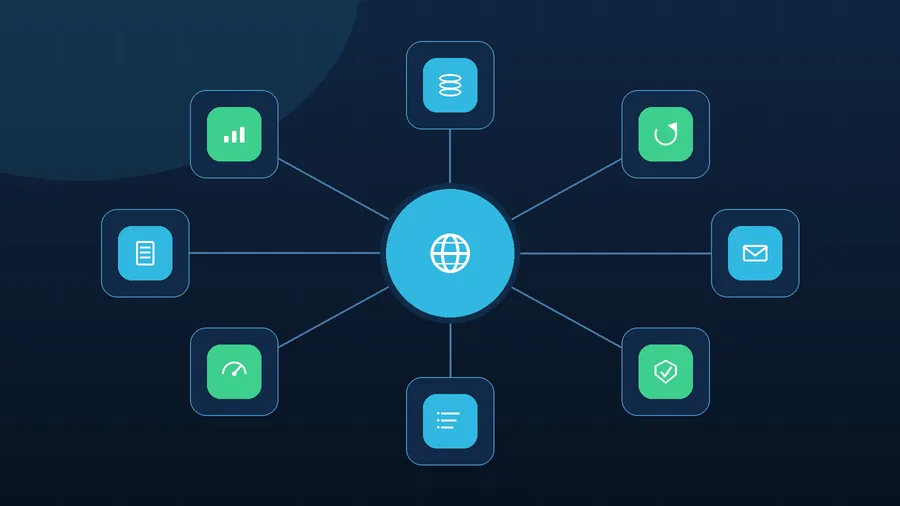
I split the work into eight areas. If a quote you received skips more than one or two of them, ask why.

Backups
A real backup covers both the files and the database, runs on a schedule you can state out loud, and is kept somewhere other than the web host that runs the site. Then comes the part most people skip: someone has to restore it, at least occasionally, to prove it works. A backup nobody has ever opened is a hope, not a safety net.

Updates
WordPress core, the theme, the plugins and sometimes the server’s PHP version all need regular updates. The click itself is the easy part. The order matters: take a fresh backup, check that the new versions are compatible with each other, update, then walk through the home page, the menu, the forms and any cart or booking tool. Blind one-click updates are how sites break on a Friday afternoon.

Forms and email
A form can happily say “Thanks, your message was sent” while nothing ever reaches your inbox. Gmail and Outlook have become strict about mail that looks unauthenticated, so someone should test the forms on a schedule and confirm that the site sends mail through proper SMTP, with SPF, DKIM and DMARC set up for your domain. For a contractor or a clinic, one lost inquiry can cost more than a month of care.

Security
This is mostly housekeeping: reviewing the list of WordPress users, removing admin accounts that nobody needs, replacing weak passwords, retiring abandoned plugins, watching file permissions and reading warnings from the host. On a site that has been left alone for a year, risk rarely arrives in one dramatic moment. It builds up quietly, one skipped update at a time.

Server log review
Logs are the part of maintenance that almost nobody offers, and they show what the site itself hides. Repeated 404 and 500 errors, hammering of wp-login.php or xmlrpc.php, odd POST requests, PHP memory problems, a single IP address asking for hundreds of pages that do not exist.
Reading them on a regular basis helps separate a site that is simply a bit slow from one where password guessing, a vulnerability scan, a broken plugin or a spam run is already underway.

Speed and technical health
Image weight, caching, JavaScript errors, heavy plugins, server load and the mobile version all belong here. Most of your visitors, especially people searching “near me” from a driveway or a job site, are on a phone. If the page takes too long to open on a weak connection, they tap back and call the next company in the results.

Content and freshness
A site goes out of date even when the code is perfect. Prices, service areas, holiday hours, team photos, privacy and terms pages, phone numbers and social links all drift. A visitor who spots last winter’s hours on a page in July starts doubting everything else on it.

Reporting
You should be able to see, in a few lines, what was done: which updates went through, whether anything failed, the date of the last good backup, the result of the form test, anything suspicious that turned up, and what still needs a decision from you. Without that, maintenance quietly becomes “we did some stuff”.
What neglect looks like: a hypothetical walk-through
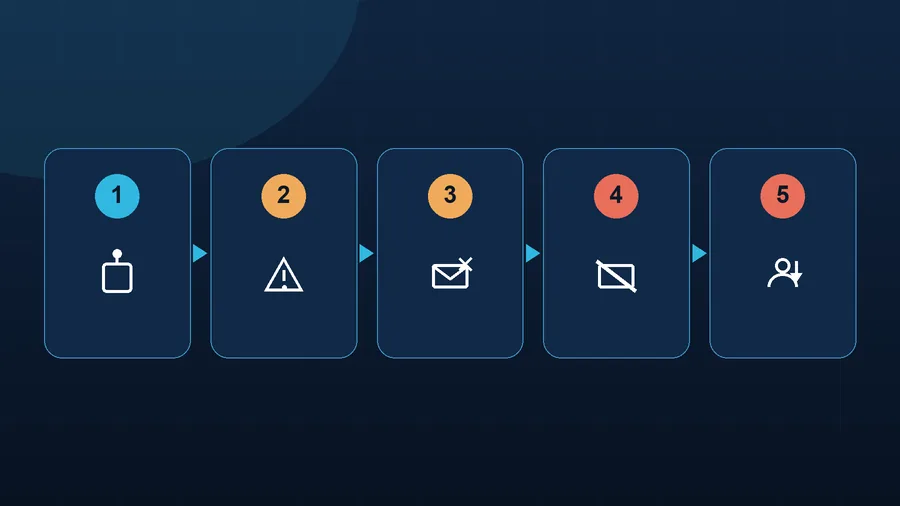
Take an imaginary HVAC company in Ohio. Its WordPress site has a quote request form, email on its own domain, a page for each service and a small blog. Nobody has logged into the admin area since spring, one plugin is two years behind, the backup plan was never tested and the server logs have never been opened. Winter is the busy season, and the phone and the form are the business.
A bot finds a known hole in the old plugin and slips in. The site looks the same from the outside, so nothing seems wrong. Behind the scenes a malicious file is dropped, hidden pages appear, and the server starts sending spam under the company’s domain name.
From there the consequences chain together.
- the host notices the burst of outgoing mail and throttles or suspends sending;
- the domain or server IP lands on spam blocklists;
- the company’s own email starts going to junk folders or bouncing;
- the quote form still “works”, but its notifications never get through;
- Google crawls the spam pages that were injected;
- a security issue shows up in Search Console;
- search results can start labeling the site as hacked or dangerous;
- rankings slip, ads send people to a warning screen, and the calls stop.
At that point nobody is talking about “just updating a plugin” anymore. The work becomes stopping the spam, taking a copy of the infected site for evidence, finding the way in, cleaning the files and database, deleting hidden admin users, rotating passwords and security keys, closing the hole, removing the spam pages, requesting a review from Google and slowly rebuilding the reputation of the domain’s email. If you are in that spot right now, my website maintenance page explains how I prevent it, and the cleanup process is described separately.
It can take days and sometimes weeks. The cruel part is that some of the damage shows up late: the mail is still being filtered, the warning is still in Search Console, and customers are still unsure about opening your link.
What a US or Canadian small business owner can check without a developer

Whether you hire me, a local agency or a nephew who is good with computers, these questions work as a quick audit of whatever arrangement you have.
- When was the last backup of both files and database, and where is it stored?
- Has anyone ever restored from it to prove it works?
- How often are WordPress, the theme and the plugins updated?
- What happens if the site breaks after an update, and how fast is the fix?
- Who tests the contact and quote forms, and how often?
- Are SPF, DKIM and DMARC set up for the domain’s email?
- Does anyone look at server logs and PHP errors?
- Does anyone check for unknown admin users and unfamiliar files?
- Is Google Search Console connected, with alerts going to a real inbox?
- Do you get a short written report of the work?
If most of these answers are vague, you do not have maintenance. You have hope that the site will keep working.
Mistakes that quietly cost the most
The expensive ones tend to look perfectly calm from the outside.
- a backup exists, but nobody has ever tried restoring it;
- updates are run with no fresh copy to fall back on;
- the contact form has not been tested in months;
- the site sends mail straight from the web server instead of through authenticated SMTP;
- nobody knows exactly who has admin access, including a former web designer;
- old plugins stay in place because they still seem to work;
- logs are never opened;
- Search Console warnings go to an inbox no one reads;
- the agreement says nothing about what happens in an emergency.
The problem is not that a site might break someday. Any system can. The problem is that without a routine, the owner usually learns about it from a customer, from the host or from a quiet week in the schedule.
When to hand maintenance to someone else
If the site brings in calls, bookings or orders, or it is tied to your business email, your ads or your reputation, ad hoc upkeep is not good enough. A dental practice that takes appointment requests online, a restaurant in Toronto with an online menu, a Seattle accounting office during tax season: for all of them an hour of downtime lands on a bad day.
I take on this work as a regular service: backups, updates, form and email checks, basic security, log review, error monitoring, speed, small fixes and a plain report. Care plans start at $79 per month, and the current options are on the pricing page. Prices are in US dollars.
If you enjoy tinkering and have the time, you can do a good share of the checks above yourself. When the site is a working tool for your business, though, it is worth having a defined routine and one person who is responsible for it.